
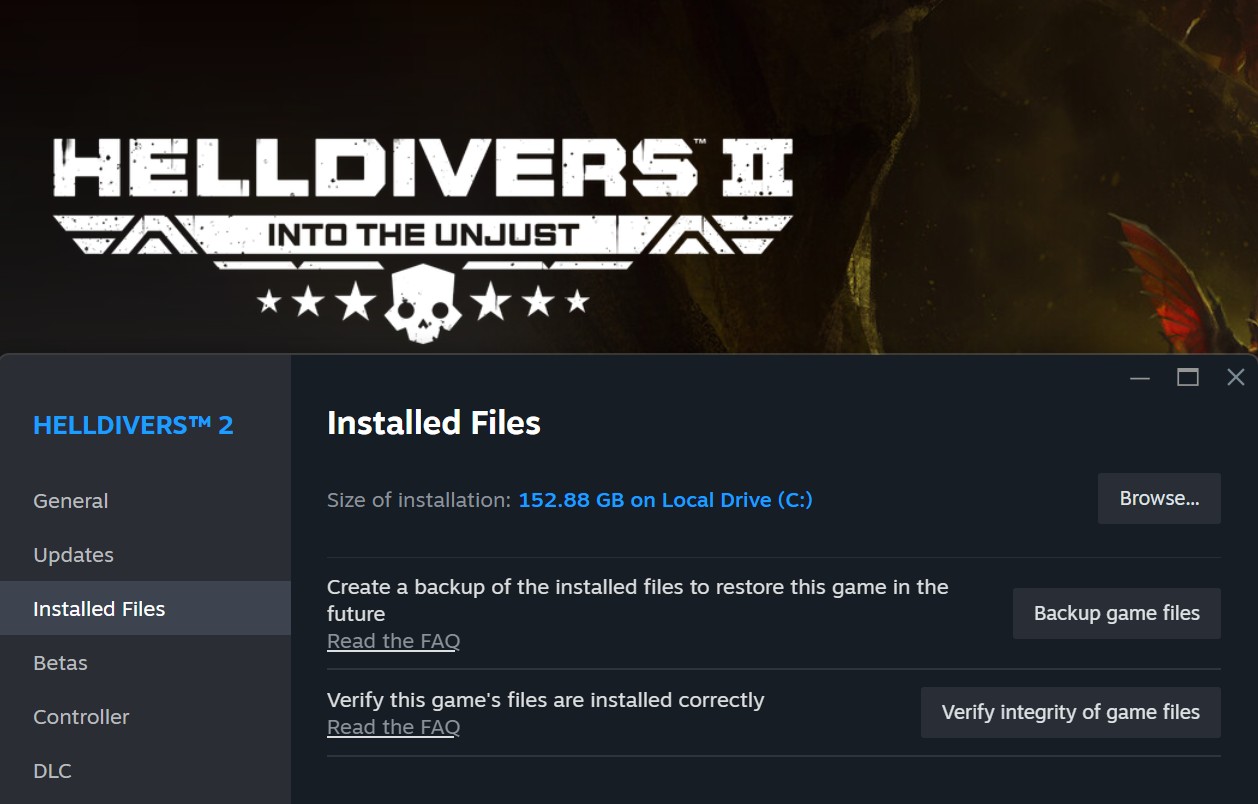
The Helldivers 2 PC installation size has ballooned to a staggering ~154GB, which is insane when compared to games like Warframe that require just ~47GB, or even huge titles like Battlefield 6 that only take up ~102GB.
In their first-ever Tech Blog back in October, Arrowhead addressed the issue, explaining that one reason was the need to consider loading times for HDD users. They went into considerable detail about the various approaches they had tested or were planning to try.
Their second Tech Blog has just been published, announcing a “Slim” version of Helldivers 2 for Steam players who want to reduce their installation size to around 23GB, roughly an 85% cut.
HELLDIVERS 2 Tech Blog #2
File size reduction beta!
Introduction
Hey Helldivers,
This blog post is a follow up to my previous post about the installation size of the game on PC which you can find here.
Today, I will update you on our progress in reducing the installation size and how you can help.
PC Installation Size
Update
We have followed through on our plans and made small reductions in the PC installation size over the last few patches while still adding new content. While this was a good start, our short term fixes have not been enough to keep up with all of the new content in the latest patch. The longer term goal has always been to bring the PC installation size much closer in line with the console versions. We are happy to report that, thanks to our partners at Nixxes, we have reached that goal much sooner than expected. By completely de-duplicating our data, we were able to reduce the PC installation size from ~154GB to ~23GB, for a total saving of ~131GB (~85%). We have completed several rounds of internal QA and are ready to roll this out to early adopters as a public technical beta. Our testing shows that for the small percentage of players still using mechanical hard disk drives, mission loading times have only increased by a few seconds in the worst cases. This is live NOW!
Only a few seconds difference?
Further good news: the change in the file size will result in minimal changes to load times – seconds at most. “Wait a minute,” I hear you ask – “didn’t you just tell us all that you duplicate data because the loading times on HDDs could be 10 times worse?”. I am pleased to say that our worst case projections did not come to pass. These loading time projections were based on industry data – comparing the loading times between SSD and HDD users where data duplication was and was not used. In the worst cases, a 5x difference was reported between instances that used duplication and those that did not. We were being very conservative and doubled that projection again to account for unknown unknowns.
Now things are different. We have real measurements specific to our game instead of industry data. We now know that the true number of players actively playing HD2 on a mechanical HDD was around 11% during the last week (seems our estimates were not so bad after all). We now know that, contrary to most games, the majority of the loading time in HELLDIVERS 2 is due to level-generation rather than asset loading. This level generation happens in parallel with loading assets from the disk and so is the main determining factor of the loading time. We now know that this is true even for users with mechanical HDDs.
Great! When does this happen? How can I help?
Do you want to be an early adopter? You can opt-in right now and help us test the slim version! There are no functional differences between the legacy and slim versions besides the installation size. You will be connected to the same galactic war as everyone else and be using the same account you always do – so all progression, war contributions and purchases will carry over between the different versions. You will still be able to matchmake and play with all other players. You can also opt-out at any time if you experience issues. It’s a low-risk way to save ~131GB of space on your drive and help us extend our testing to real-life conditions. Full instructions for opting in and out of the technical beta can be found at the end of this blog post.
The future!
When the public technical beta confirms that there are no issues present in the slim version, it will become the default version for everyone. For a limited time, we will allow players to opt-in to the legacy version as a way to self-troubleshoot any issues that were not picked up during our internal testing or the public technical beta. Given the very minor differences in loading times between the two versions, there is no justification for us to keep supporting the legacy version long term. Maintaining the legacy version alongside the slim version would only add extra burden to our developers, build machines, QA teams and release processes. Assuming all goes smoothly, the legacy version will be discontinued some time next year.
Finally
Thank you to the community for all your support with the game as we work through these technical pieces, and thank you to our partners at Nixxes for helping us troubleshoot and implement all the above improvements.
Beta Instructions
Warning!
Modders beware! Any patch we roll out can break the game if you have mods installed and this one is no exception. We recommend that only players with a clean installation opt-in to the slim version. As always, you mod the game at your own risk.
If any of this seems a bit scary to you, we encourage you to just sit back and wait for the slim version to become the default version.
Opting in to the slim version
Step 1.
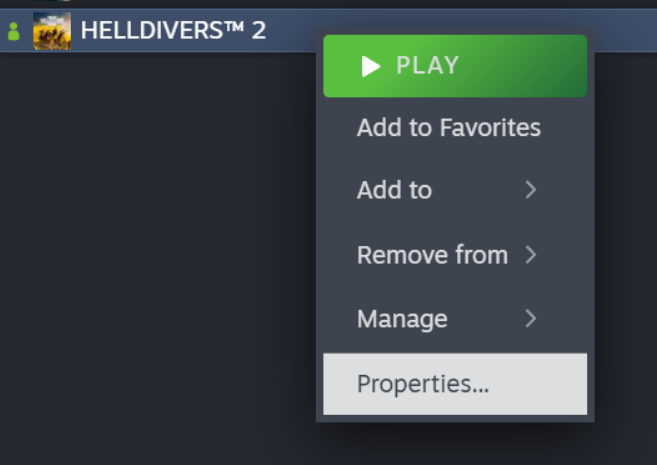
In your steam library, right click on HELLDIVERS 2 and select ‘Properties’.
Step 2.
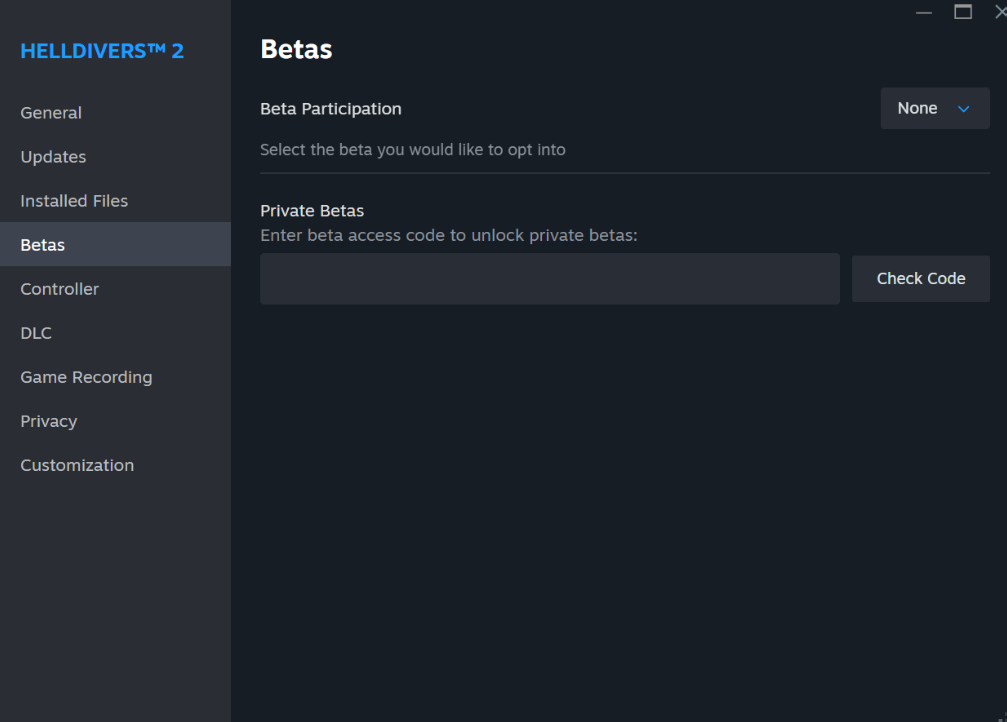
Next select the ‘Betas’ tab.
Step 3.
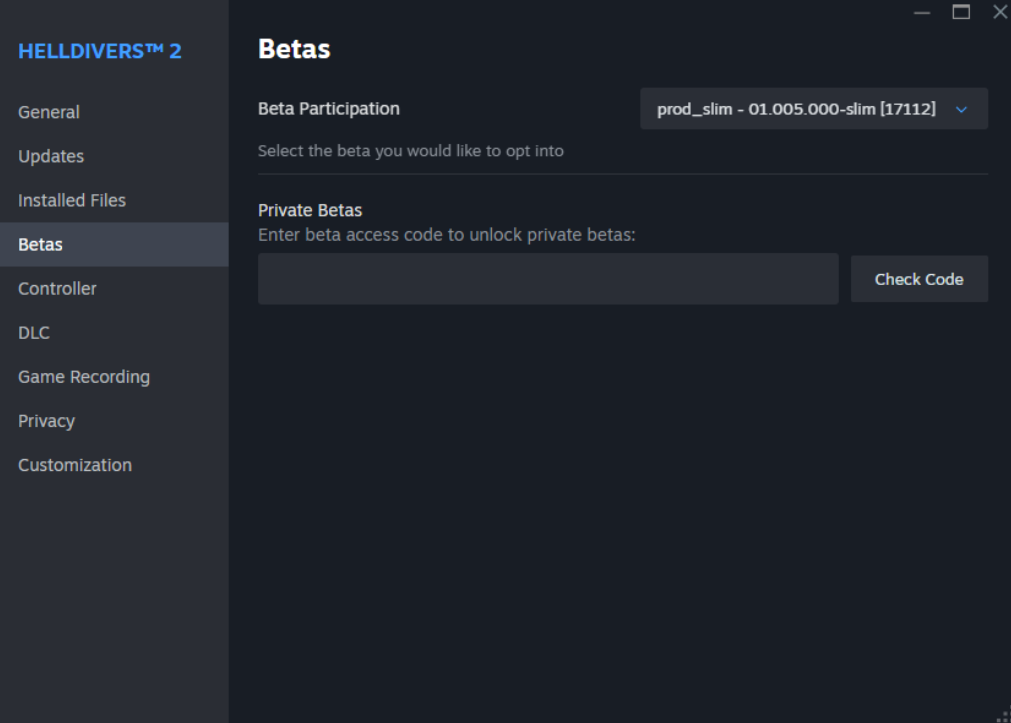
In the Beta Participation drop down list, select “prod_slim”
Step 4.
Finally just close the properties dialog and wait for the game to download the patch!
Opting out of the slim version
If for any reason you want to opt-out of the slim version, you can repeat the above steps and select “None” from the Beta Participation drop-down instead. If you opt-out due to experiencing problems with the slim version, please report them to our player support team.
Opting in to the legacy version
In case of emergency! Once we make the slim version the default version, you will be able to opt-in to the legacy version by selecting “prod_legacy” from the Beta Participation down-down. This will only work for a limited time, so please be sure to report any issues specific to the slim version to our player support team.